Valve Rebuilt Steam's Market Around CS2 Skins - What Actually Changes for Buyers

Valve Rebuilt Steam's Market Around CS2 Skins - What Actually Changes for Buyers
Valve generated more than 27 million new item images just so you could see the exact skin you are about to buy. That figure comes straight from Valve's own beta notes, and it tells you what the redesigned Steam Community Market is really about: deleting the guesswork that pushed CS2 traders onto third-party websites for the better part of a decade.
The redesign is live in beta now. If you have opened a CS2 listing recently and noticed an Exit Market Beta button at the top of the page, you have already seen it. The layout is wider, results load as you scroll, and item pages surface information that used to require a separate website - or launching the game - to find.
Here is what actually changed, and how to use it the next time you buy or list a skin.
Step 1: Read the Listing Instead of the Price Tag
In the old Market, every listing looked identical: one generic thumbnail and a number. You could not tell whether two "Field-Tested" copies of the same skin looked the same, because the display gave you no float value and no pattern index. You were comparing prices for items you could not actually see.
The new listing pages fix that. Each CS2 listing now shows the exact float value - 0.0734, not just "Minimal Wear" - along with the pattern template index from 1 to 1000, applied stickers with their positions and scrape percentages, attached charms, StatTrak kill counts, and souvenir details. Wear category ceilings are printed next to the float so you know how much room is left inside the bracket.
This matters because float is where most overpaying happens. Two copies of the same skin in the same wear bracket can sit 20% apart in price purely because one is cleaner. On the old interface you paid that premium blind. On the new one you can see the number that justifies it - or proves it does not exist.
Two habits are worth building immediately. Compare the float against its bracket ceiling first: a 0.0734 Factory New and a 0.14 Factory New carry the same label but are not the same product. Then check the price graph before buying anything with a thin order book, because a listing that looks cheap against yesterday's price may simply be cheaper than a spike nobody ever bought into.
Stickers deserve their own mention. Listing pages now link to the Market page for each applied sticker and print its current value as part of the item information. On a five-cent gun carrying a $40 sticker, that is the difference between an obvious flip and a listing you scroll straight past.
The images are float-accurate too. Valve pre-rendered 27 million unique listing images rather than reusing one studio shot, so the AWP you are looking at shows the actual wear texture and the actual sticker placement you would receive.
Step 2: Use the Wear Tabs to Kill the Float Premium
Wear variants used to live on five separate pages with five separate URLs. "AK-47 | Vulcan (Factory New)" and "AK-47 | Vulcan (Field-Tested)" were effectively different products that you had to compare from memory.
Now they are grouped onto a single page with tabs. Hovering a tab previews that wear's price, and clicking it updates both the listings and the price graph below in real time. A StatTrak toggle sits next to the tabs for the same skin, so the four or five variants that used to take five page loads now take one.
That makes the most common question in CS2 buying almost trivial to answer: is the Factory New premium actually visible? Some finishes fall apart past 0.20 float and earn their premium honestly. Others look nearly identical from Minimal Wear down to mid Field-Tested, which means the extra money buys a label rather than a look.
The price graph on each page now covers week, month and yearly ranges with volume data attached, so you can see whether the number in front of you is normal for the item or a spike you should wait out.
Step 3: Filter by the Things That Actually Move Price
The old Market let you filter by weapon, wear and rarity, then left you to page through hundreds of listings. The new filters read CS2's internal item data, which changes what is searchable at all.
- Custom float ranges - search only listings between 0.15 and 0.18 instead of an entire wear bracket
- Pattern ID and pattern ranges - pull a specific template rather than scanning for it by eye
- Applied stickers - filter by team, tournament or player, useful when the sticker is worth more than the gun
- Attached charms - a category that barely existed as a filter before
- Sorting by float or pattern - instead of sorting by price and hoping
For anyone who has bought a Case Hardened or a Fade finish, this is the biggest quality-of-life change in the patch. Pattern hunting used to be a manual grind. Now it is a filter, and the difference shows up directly in what you pay.
Step 4: List an Item Without Losing Access to It
This is the change that quietly rewires trading behaviour. Previously, listing a skin on the Steam Market pulled it out of your inventory immediately. You could not equip it, inspect it in-game, or show it off until the listing sold or you cancelled it.
Under the new beta, listed items stay in your inventory and remain equippable. You can run a listed knife in matchmaking while it waits for a buyer. For anyone holding a high-value item through a slow market, that removes a genuine cost: listing an item and using it are no longer mutually exclusive.
Two things have not changed. Steam still takes its 15% cut, and proceeds still land in Steam Wallet credit rather than your bank account. The redesign modernised the shopfront, not the economics underneath it.
One thing to watch if you share links
The URL structure changed as part of the grouping work. A single page now covers all five wear variants plus StatTrak, and the address is a short bucket token instead of the skin's name. Saved links, Discord bots and price-tracker scrapers that read a skin name out of the URL will not resolve the variant you meant any more. Pick the variant first, then copy.
Where Third-Party Markets Still Win
Valve has closed most of the information gap, but not the money gap. Float, pattern, stickers and charms are now native to Steam - yet for anyone selling rather than buying, the structural problem is unchanged: Steam Wallet is not cash.
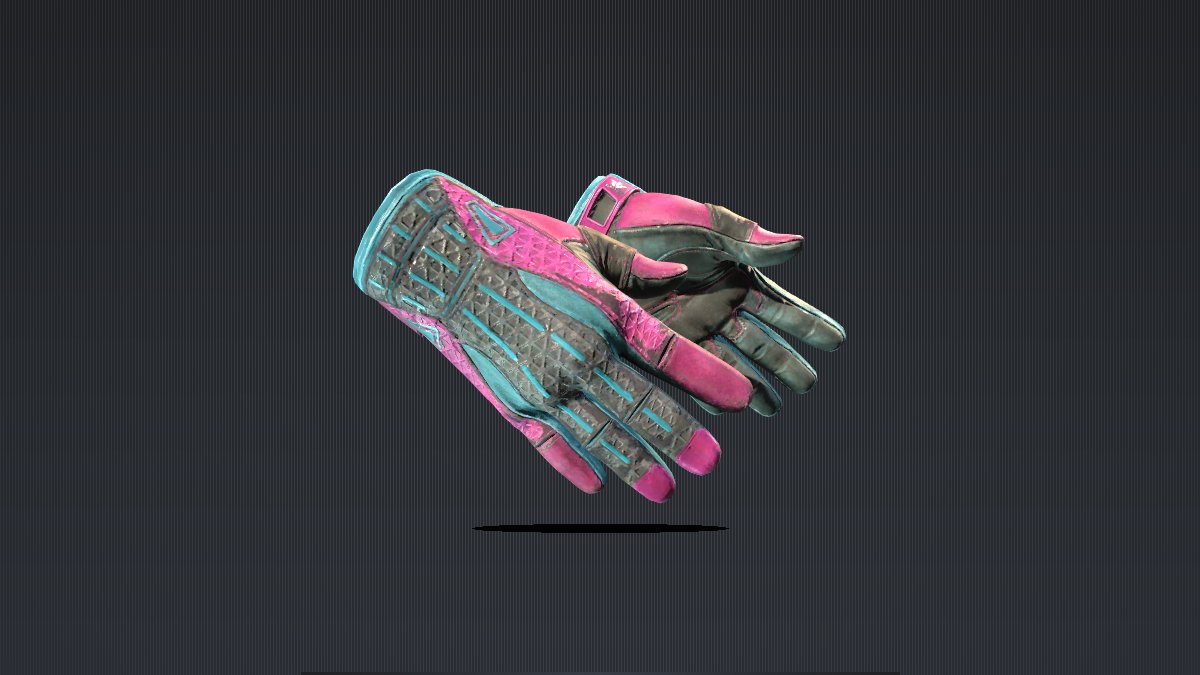
Take the glove pictured above, Sport Gloves | Vice (Field-Tested). On the skinvs marketplace it trades around $573 against 293 available listings, and that number is withdrawable. The equivalent Steam listing is spendable only inside Steam. That single difference still decides where most serious sellers list their inventory.
What the redesign changes is how well-informed you are before you decide. If you want to watch how fresh listings settle against a live market, the Fan Favorite case is a reasonable place to start - same float logic, same pattern logic, no beta toggle required.
The Short Version
Read the float before the price. Use the wear tabs to test whether an upgrade is visible. Filter by pattern when the finish is pattern-dependent. And remember that listing on Steam no longer locks an item away from you.
Valve spent 27 million generated images making sure you could see what you were buying. The buyers who actually use that information will keep paying less than the ones who scroll past it.